㈜아이스트

X-RAY LINE DETECTOR

AiST is a professional x-ray detector manufacturer

 
SOFTWARE / SDK  
AT-Viewer & SDK Solution

AiST TECH provides dedicated viewer software and an SDK for X-ray line detector control, image acquisition, calibration, and system integration.
AT-Viewer supports detector connection and status monitoring, image acquisition, calibration, and image saving, while the SDK enables reliable integration with customer X-ray inspection equipment, inspection algorithms, and automation systems.
AT-Viewer Software
AT-Viewer is dedicated viewer software designed to support the testing and operation of AiST TECH detectors.
It provides detector connection and status monitoring, real-time image acquisition, calibration, parameter settings, and image saving for equipment development, sample testing, and image quality evaluation.
RAW Image & Correction Image
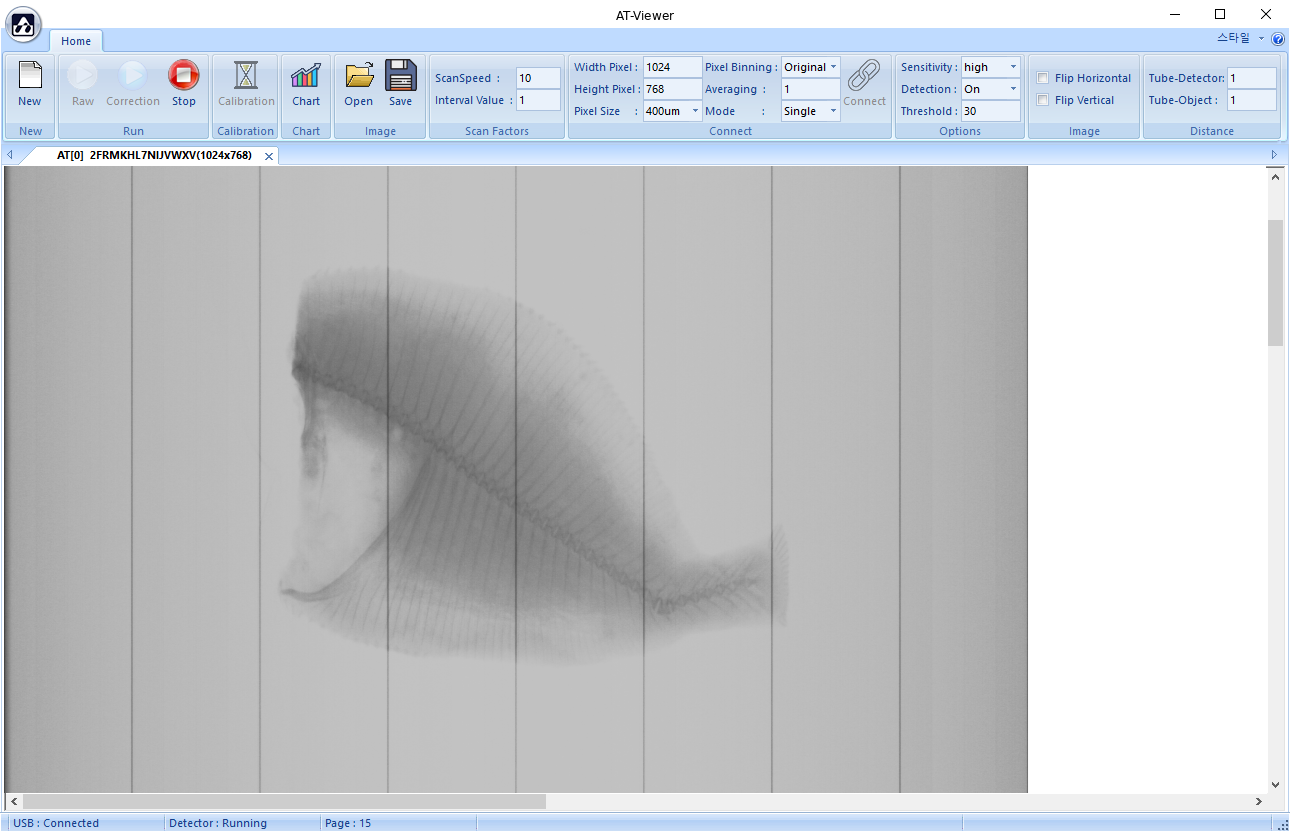
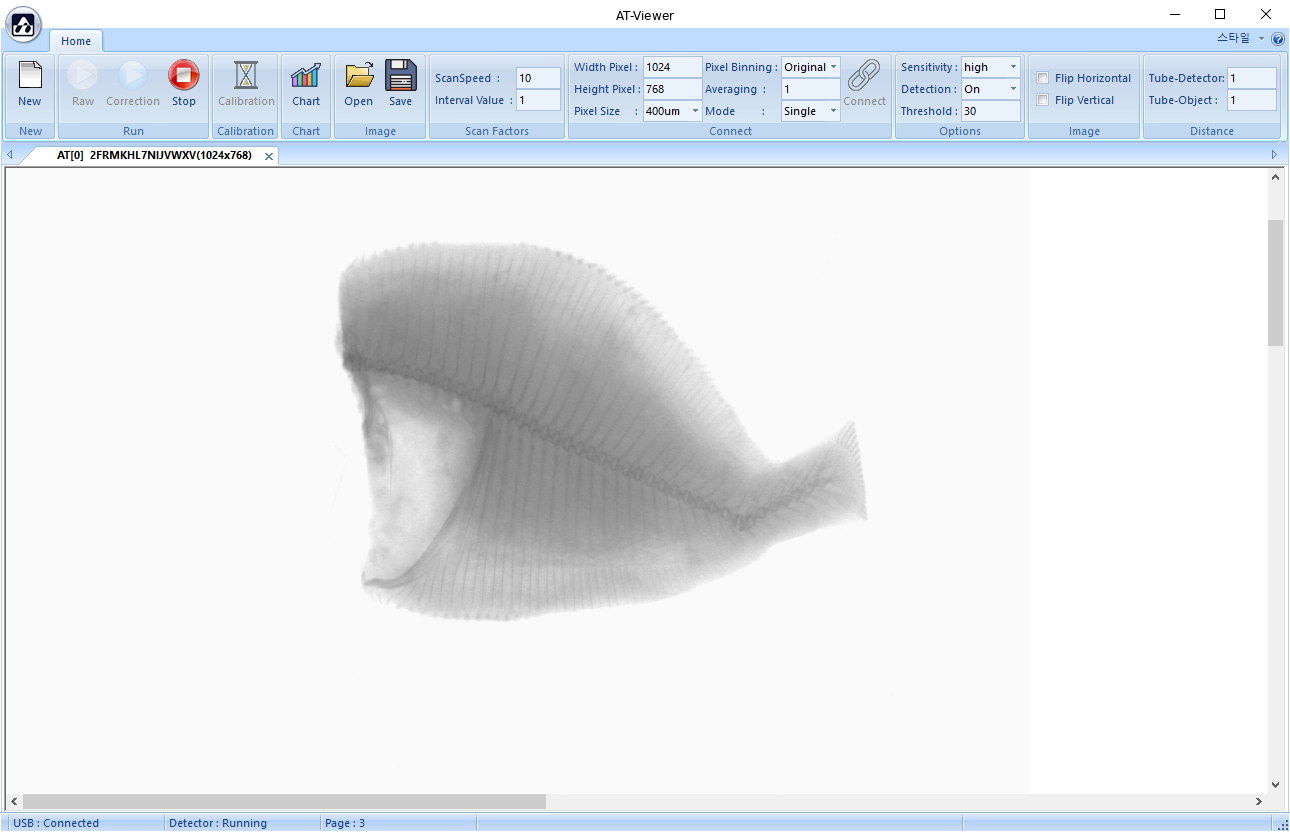
AT-Viewer displays both RAW images acquired from the detector and correction images with calibration data applied.
Comparing the two images makes it possible to review image changes resulting from calibration.
RAW Image Acquisition
AT-Viewer RAW image screen
View RAW images acquired from the detector before calibration data is applied.
Correction Image
AT-Viewer correction image screen
View correction images with calibration data applied.
Key Functions

AT-Viewer provides detector connection, image acquisition, calibration, parameter settings, and status monitoring to support efficient X-ray image quality evaluation during equipment development and sample testing.

01
Detector Connection
Check the detector connection status and basic information such as Width, Height, and Pixel Size.
02
Image Acquisition
Acquire RAW and correction images and monitor real-time X-ray image output.
03
Calibration
Acquire calibration data and view correction images with the data applied.
04
Parameter Setting
Configure key inspection parameters, including Scan Speed, Sensitivity, and Threshold.
05
Image Open / Save
Set the image storage path and open the saved-image folder to use acquired X-ray images for sample testing and image analysis.
06
Status Monitoring
Monitor USB connection, detector operation, and image acquisition status in real time.
AT-Viewer Workflow
After connecting the detector and configuring parameters, AT-Viewer can acquire RAW images or perform calibration.
Acquired RAW images and correction images with calibration data applied can be saved for sample testing and image quality analysis.
01
Detector Connection

Verify the USB connection and detector operating status.

02
Parameter Setting

Configure inspection parameters such as Scan Speed, Pixel Size, and Sensitivity.

03A
RAW Image Path

Acquire RAW image data before calibration is applied.

03B
Calibration Path

Perform calibration after connecting the detector and configuring operating conditions.

04
Correction Image

View correction images with calibration data applied.

05
Image Save

Save RAW or correction images.

Image Save is a common output step for both RAW and correction images.
Calibration
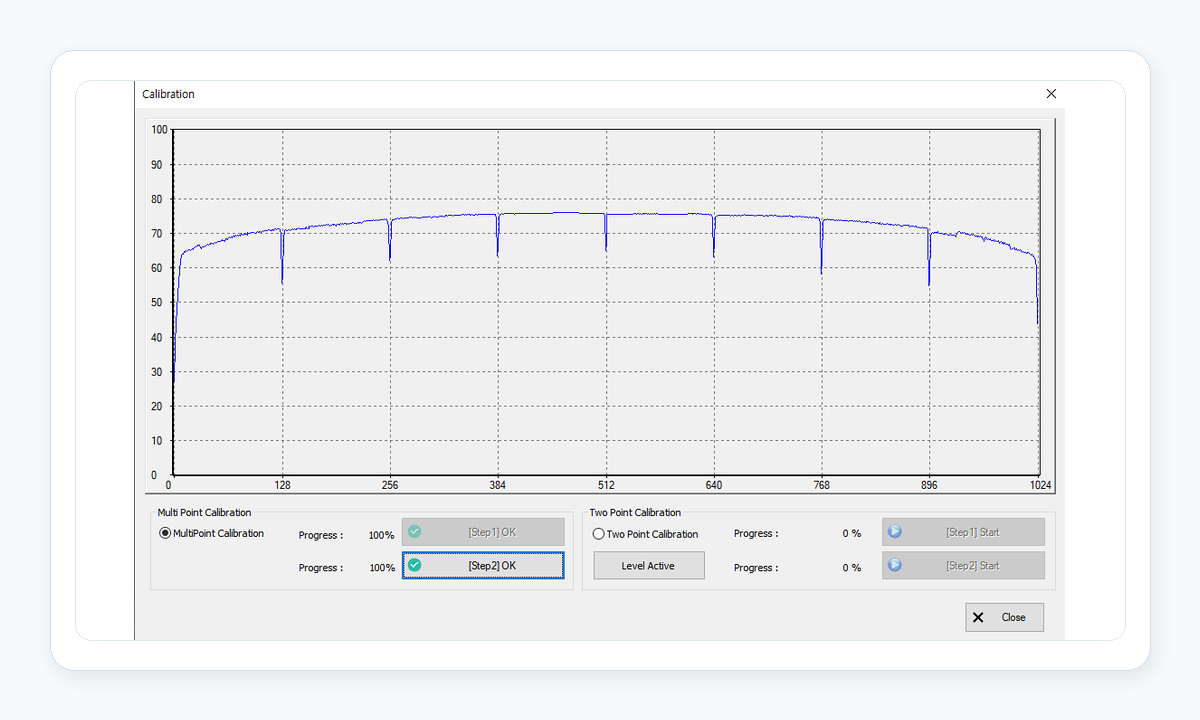
AT-Viewer displays calibration progress, X-ray OFF / ON steps, and the Energy Chart on a single screen.
Monitor calibration progress and pixel-level signals to check detector status.
AT-Viewer calibration screen
Calibration Monitoring
01 Progress & Step

Monitor calibration progress and the X-ray OFF / ON data acquisition steps.

02 Energy Chart

Monitor the Energy Level and calibration progress through the Energy Chart.

03 Sensor Check

Use pixel-level signal data to check for Pixel Error and sensor defects.

SDK
AiST SDK is a development interface for integrating AiST detectors with customer X-ray inspection software and equipment control systems.
C++ SDK is provided as the default interface, while .NET Library / ActiveX support is available depending on the customer development environment.
SDK Architecture

AiST SDK operates between the detector and customer inspection software, handling detector control, parameter settings, calibration, image acquisition, and data transfer.

Detector
AiST X-ray Line Detector

Connected to AiST SDK, the detector provides operating-status information and image data and supports calibration data acquisition.

SDK
AiST SDK Interface

An interface layer for detector control, parameter settings, calibration, image acquisition, and customer software integration.

C++ SDK Default

The default development interface for detector control, calibration, and image acquisition.

.NET Library / ActiveX Optional

Integration with .NET-based Windows applications and ActiveX-based legacy systems is optionally available depending on the customer development environment.

Application
Customer Inspection Software

Uses data delivered by the SDK to implement X-ray inspection functions in customer inspection algorithms, equipment control software, HMI, and automation systems.

Key API Examples

The following are selected APIs used for detector connection, basic information, image dimensions, and operating status.

Function Description
atd_Connect() Connect to the detector
atd_GetDetectorInfo() Retrieve detector information
atd_GetDetectorProtocolVersion() Retrieve the detector protocol version
atd_GetImageWidth() Retrieve the image width
atd_GetImageHeight() Retrieve the image height
atd_GetCalibrationMode() Retrieve the calibration mode
atd_GetObjectDetection() Retrieve the object detection status
For questions about the SDK or API, please use the Contact Form or email aisttech@aisttech.co.kr.

TEL 063-852-5400 E-mail aisttech@aisttech.co.kr